Monday, September 2, 2013

Superlative Gallery apps for android

Having a decent camera on your smartphone results in you taking a number of pictures with it. so here are some of the top free gallery apps for your smartphone

Vaulty
Vaulty is an app which protect or lock your images from you Android smartphone to access anybody rest of you. Because this app hide your images and video from gallery for free. If you have unlimited photo’s and video it also hide or lock your data. It almost sealed your dat


Super Vault Android app
Super Vault has many super features like hide you lock your messages, images video’s, contacts, or hide any file or app from your System and can not access other user rest of you. It is nothing but it also hide history of files. This is an amazing app from Google play and it totally keeps our privacy. It include AES encryption. 


Gallery Lock free
Gallery Lock free app is one of the prominent app from Google play. It enables your all files secure and  locked with a password or PIN. It shows your files inn your gallery but can’t access any other user. There is features of password criteria authentication when unlock you files type. The user gives an average point 4.5 out of 5. This app will run on Android 2.2 and newer

KeepSafe Android app
KeepSafe is one of the best app present in Google Play. It keeps your privacy maintain. If you want to open any files or photo’s from your Android smartphone first of all enter you Password if you install KeepSafe app in your system. It is easier to use than other app. Zoom and rotate features added and make this pp more useful. It enable multi fast lock and unlock files. It also gives free slide-share features when you open any files on your system.

Friday, August 30, 2013

How to Watch Blocked Videos on YouTube

YouTube lets the publishers block their videos in certain areas, regions or countries. The reason may be anything varying from political to sexual inappropriacy of the content. However, if you are hell bent on viewing the video then here is a quick guide to help you get your dose of some blocked content.

The easiest way is to replace  /watch?v= part with /v 

Example- 

[Before] www.youtube.com/watch?v=yEwD36Dk1jw 


[After] www.youtube.com/v/yEwD36Dk1jw 

Or type "pwn" before youtube.com in the http address 


[Before] www.youtube.com/watch?v=yEwD36Dk1jw 


[After] www.pwnyoutube.com/watch?v=yEwD36Dk1jw 


another way is to install an add on to your chrome or firefox browser
ProxTube - Unblock YouTube :: Add-ons for Firefox here.

These two methods should do the trick. Enjoy the content.

Thursday, August 29, 2013

Video Chat apps on Android

With the increase in the amount of android enabled smartphones, people are moving towards the option of video calling dumping the age old traditon of video call. Undoubtedly, Video calling is much better than a voice call because it gives a much more realistic feeling to the virtual presence of the two sides.

Video chat requires an internet connection making it cheaper than a voice call in most cases. So, Here are some of the top of the line video chat apps available on play store.

1. Google Hangout: The cross platform primary video chat by Google, was unveiled at the Google IO'13 this year and is a replacement to Gtalk. Amazingly grat video response and crystal clear audio make it the best video app on the play store. Also has awesome features like adding live beards to your own video. Haha.


2.Tango: Tango packs in the features which will have you video chatting with ease and do a lot more. Play Games, greet your loved ones with live emojis and send in text messages right from your phone through this app. 

3.Line is another superlative video app, with features to support voice call and voice texts as well. Extremely popular in countries like India.
4. Skype Undoubtedly it is the supreme of all video chat apps alternatives and also free. It is all popular VOIP and video chat services for android iOS, Windows. Here you can make calls and video chat with fun at instance as well as comfort and easier anywhere Skype to Skype no matter they are on any operating system.

Also to mention some messengers which may not be video chat enabled:

VIber: Top of the line text and voice calling messenger.


Kakao talk is coolest app from Android and it is available for Android, iOS, Bada OS. This app is kind of open source and send messages through Internet anywhere. And also chat with in a group and after manage your group chat. You have fun with some great emotions pictures, stickers etc. It is fully free having 75 millions users are registers.


Wednesday, August 28, 2013

Download YouTube videos on Mobile

You Tube is undoubtedly the most popular video sharing and viewing website.From catching your favorite songs, to getting in the latest of global news, YouTube has it all.

 However due to limited access to the internet or slow download speeds you may sometimes feel the urge to permanently store the video on your mobile device rather than waiting for the video to buffer. So here is a tutorial on how to download YouTube videos DIRECTLY to your mobile.

For any Java enabled mobile device
1.Download Opera Mini browser for your phone from here. Test the various versions for compatibility issues..

2. In the YouTube search bar, search for any video you like, e.g. You may type something like this "How to Chat on Facebook using Opera Mini Mobile" in the search bar and then click on search. 

3. you'll see a list of video search results relating to what you just searched, select any video you like by clicking on it, note, do not click on watch video. 


4. Go to the address bar, i.e. (Where you usually type the address of any website you like to visit.) and click on it, there you'll see an address that looks like this " m.youtube.com/watch?gl=US&hl=en-GB&client=mv-google&v=yPD346Zh6jo ". 


5. Delete the
 ( m. ) and replace it with ( ss ) now your address should look like this
" ssyoutube.com/watch?gl=US&hl=en-GB&client=mv-google&v=yPD346Zh6jo " click ok, a new page (i.e. Download page) where you can download your video will loaded. 


6. On the new page loaded, you will see different video formats with which you can download your video, some of the formats you'll see are".mp4 .3gp .flv"etc. Select any format you'll like but I'll advice you to choose .mp4, then, 


7. Your opera mini browser will ask you to choose a folder in which you'll like to save your video, choose any folder you'll like and then, 


8. Download the video. So how it is easy to download YouTube videos on your opera mini mobile browser using third party service. 


For Android/iOS device:
GO to the respective app store and play store on your device and search for a YouTube down loader. Download and install any of the downloaders. My Favourite would be the Tube Video downloader.
Follow the on screen instructions of the app.


Tuesday, April 23, 2013

Glass


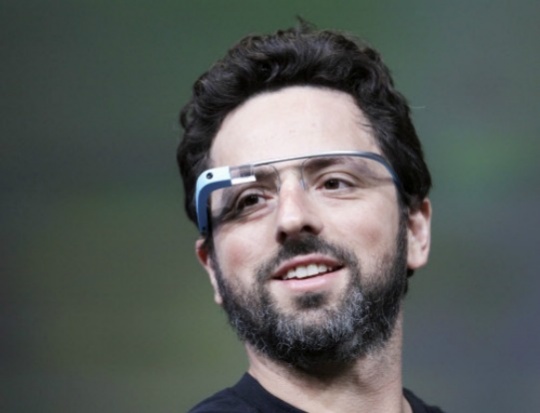
Hello friends! I am Vipul Khullar, a first year CSE undergrad. A few years ago, I watched Pranav Mistry's video on TED explaining the mind-boggling technology created by him, The Sixth Sense! I believed that something like that could only happen in about 20-30 years! :P But with the fast growth of technology in the past few years, smartphones with awesome computing speeds are in our hands and with the launch of the Google Glass, I'm sure the time is near when the Gesture Technology will be a part of our daily lives.

So what's a Google Glass ? Is it just another pair of goggles or something that is technologically advanced, capable of doing numerous work with ease and grace? Obviously, you already know the answer :D


Google glass as the name implies is a pair of glasses that you wear but it can do things what no other spectacles can even dream of. And the specs on these "specs" are quite mind boggling. It has a tiny high resolution screen embedded right where your peripheral vision starts and because it's so close that to eye it appears like a 25 inch screen! The glass band has a touch pad that lets you to slide your fingers up and down to scroll through pages and you tap to select an item. The bone conduction transducer transmits sound directly to ears thus eliminating the need of headphones


This device is also fitted with speakers, microphone, and a motion sensor that interpret command based on wearer's head movements. Eye movements can also be used to control the device and simple head motion allow you to scroll through apps which is really amazing! Google glass allows you to do everything that a smartphone does without you having to fish it out of pocket. It can film or photograph on demand, provide real time info on your head plus blink your eyes twice to activate picture boggling features.Shake your head at left to see news, notification emails etc. It also tells exact GPS location, bio-data, meetings and the schedule for the evening. Whisper into the microphone to activate face recognition feature and much more.

If my entire futuristic description has astonished you and excited you towards technology then you are not alone. But let me clarify you it is not about the future, this is about now. Google Glasses and other tech glasses like The Sixth Sense by Pranav Mistry has now reached a point where it's no longer about imagining all these awesome things. This could well be our lives from here on. So Long Guys!

PS : One more awesome feature of the Glass according to me would be the the ability to check the opponent's power level, which would be quite a useful thing for geeks like me :D Only Dragon Ball Z fans will get this :P 


Saturday, March 23, 2013

Myth-onology

Clearly, the explosive growth of the Internet has created a fair share of misunderstandings, fabricationand,myths . so, just to make you guys more comfortable and educated about the actual, definite facts about tech, and clear all related misconceptions  here are some rumors laid bare, and how they affect you.

1. Expensive HDMI cables are better than cheap onesDon't be pressured by salespeople to buy marked-up HDMI cables in retail stores. Brent Shelton from Ebates.com agrees. Cables which you can buy online are much, much cheaper and they send exactly the same HDMI signal, which they are supposed to..uh..yeah!
The only thing cheap HDMI cables can't do, is pad the pockets of retailers with profits derived from products marked up hundred of times.

2. More the Megapixels, better is the camera: Now, this one has being doing rounds for quite sometime now. The truth is much more complicated. While, megapixels definitely affect quality, other factors, such as Color, sharpening, the lens type and quality are much more important. This goes same for Cameras on Smartphones  the most recent and the best example would be the camera on the HTC One. The camera is only 4MP, but captures pictures equivalent to a camera having 8MP. So, before you buy a new camera, be sure to consult a pro and read the consumer reviews rather than the MegaPixels.


Apple laptop computer3.Macs can't get viruses: HOLY CRAP ON A CRACKER!! what kind of people come up with such rumors? For the  one thing i am absolutely sure about the Hacking community is that they really enjoy challenges. However, the likelihood of an Apple Macintosh user getting a virus when compared to a Microsoft Windows user is very little to none. In fact, many of the Apple Macintosh users don't even run an antivirus protection program.   And, just so you guys know, half million Mac users were infected with a Trojan last year in April, with half the users being in the U.S.


4. Moore's law will always hold trueMoore's Law is generally taken to mean that the number of transistors on a chip -- and by extension, processing power -- doubles every two years. In reality, Gordon Moore, the computer scientist who originated Moore's Law in 1965, was talking about the economic costs of chip production and not the scientific achievements behind advances in chip design. 
One analyst has predicted that by 2014, transistors will be 20 nanometers in size but that any further reductions in chip size will be too expensive for mass production [source: Nuttall].
For comparison, as of summer 2009, only Samsung and Intel have invested in making 22-nanometer chips.


5. Unlimited Texting plan save you money: if you belong to a school of thought which actually believes in this ideology, please contact me, so that i can arrange a meet with you and indulge in a lot of public mockery. 

Sunday, March 17, 2013

Google Now Voice Commands

I've been intending to write this post for a while but couldn't find time (procrastination, you know :-P) . But here it is! Google Now is an intelligent personal assistant from Google and comes default with 4.1 Jelly Bean, a flavor of the android operating system. I've been amazed by this technology ever since it was demonstrated at the 2012 Google I/O. It answers questions, gets directions, sets alarms, makes recommendations and performs various actions by delegating requests to a set of web services. The interface is awesome, it depicts information with the help of cards. You'll be seeing their screenshots later in this post.

The main feature that makes Google Now awesome and better than it's competitors which include Siri and S-Voice is it's voice recognition and intuition. Yeah right, intuition. Google  Now takes out information like airport tickets from a person's Gmail account and generates a card showing the person's boarding pass! It generates a card from the person's search history. For  example you searched about a basketball team and you'll see a card which will allow you to buy tickets for a match in which that team plays again! Whenever you are away at work, it will generate a card showing you the shortest and less traffic infested route back to your house! i searched about Galaxy S4 on Google and bam! There was a card waiting for me in Google Now.


Specialized cards currently comprise of : 
  • Activity Summary(Walking)
  • Birthday
  • Events
  • Flights
  • Movies 
  • News
  • Meetings
  • Photo Spot nearby
  • Package Tracking
  • Places
  • Public Alerts
  • Public Transit
  • Research Topics
  • Sports 
  • Stock
  • Traffic Updates
  • Attractions nearby while traveling
  • Time Back Home
  • Translate
  • Weather
Phew! :-P

Last Sunday, I got my Nexus 4 and I've been playing with Google Now a lot! To start asking questions, you just have to tap on the mic icon shown in the image or say "Google"  after you've already opened Google Now after swiping up from the Home key.


Let us discuss about some of the voice actions which I came across!

  1. Open an App

    You can say "Open [app]" to open an app. For example, "Open Camera" opens the camera app.

                                               
  2. Set an Alarm

    To quickly set an alarm, say "Set an alarm for [time]" or "Set an alarm for [time] from now". You can also add a label For example "Alarm for 6 Hours Wake Up."

                                               
  3. Make a note

    To make a note, say "Note to self" and continue talking to add words to your note. It will create a note both in audio and text which will be emailed to your Gmail account, so that you can listen to the exact words you said !

                                               
  4. Create a Calendar Event

    You can just say "Create a calendar event : Lunch in New Delhi, Monday at noon"

                                               
  5. Send an Email

    Voice actions can be used to send an entire email. For example, you could say that "Send email to Vinayak Mehta, subject, Test email, message, Testing Google Voice actions"
  6. Send a Message

    Voice actions can send text messages in the same way it can send emails! For example. you could say "Send SMS to Pranu Sarna, message, Hey"
  7. Make a Phone Call

    To make a phone call, just say "Call" followed by the phone number or the name of the contact.

                                             
  8. Scan a Barcode

    You don't need a third party barcode scanner app on your phone, whenever you want to scan a barcode or a QR code you just gotta say "Scan a Barcode"  and boom! Google will give you a barcode scanner.


Sunday, March 10, 2013

Learn to code like a Boss

Buying the latest iPhone, and keeping up to date with the latest gossip in the tech industry, is all fine and good. But, if you don't know how to code, you ain't no kind of techie. As the tech industry expands at the current exponential speed, you have the choice to become a consumer of tech or someone who understands it.

'Programming Literacy is going to be an incredibly important skill in the next few years' says Codecademy founder Zach Sims. Startups like Codecademy and the TheNewBoston are making it easy to learn coding online, specially for school children. Intense programs such as bloc aim at making you seasoned programmers from complete noobs within 12 weeks. Nice.

so, if you think coding is only for some math geniuses and geeks, think again. In Estonia, all children in public schools are taught programming. Recently, the mayor of New York City, Mike Bloomberg signed up for a course on codecademy. :')

Most people will be intimidated by the endless lines of numbers and characters which is difficult to decipher than most of Hieroglyphics. well, it can be a bit difficult in the starting. That is why i suggest, beginners start with a Graphical Programming language called scratch. Scratch is  phenomenally good in laying the basics of programming, which i think are the most important for a good programmer.

Here are some facts about coding, and yeah i strongly promote female invasion of the programming field. Please, God!      
                                                               (click on the image to enlarge)

"The programmers of tomorrow are the wizards of the future. You’re going to look like you have magic powers compared to everybody else." -Gabe Newell, Founder and President, Valve 


Tuesday, March 5, 2013

Windows Tweak #2 : Disabling the Aero Theme on Win 7

Windows 8 has arrived but it is not as popular among PC users as compared to it's predecessor Windows 7. In fact, it is still occupies the most area in the pie chart of most used operating systems!

Windows 7 is an operating system produced by Microsoft, which was released in July 22, 2009. I was introduced to this OS at around mid 2010. But immediately after using it, my first impression was that it was faster and more efficient than Windows XP. I cannot forget the awesomely new and completely redesigned Windows Aero UI that was the successor of Windows XP's "Luna" theme. It has that glass theme and many more effects that require a decent graphic card. Otherwise, the UI tends to get sloppy.

Let me tell you the minimum hardware requirements for Windows 7. 
  • 1 GHz Processor (32 or 64 Bit)
  • 1 GB of RAM
  • 16 GB of available disk space
  • Support for DX 9 Graphics with 128 MB of Graphic Card (for Aero UI)
  • A DVD-R/W Drive (of course :P) 
Unfortunately, I didn't have a graphic card installed on my PC at that time and the RAM was only 512 MB (:P), so I decided to use a basic theme which don't use the Aero interface. The Aero UI certainly adds some floss to Windows 7 but it requires a decent hardware to run smoothly. So why don't we just avoid the it if what we care about more in Windows 7 is speed and performance. How to disable the Aero Theme on Windows 7 :
  • First, right click on the desktop and choose Personalize from the menu.


  • Then you can simply scroll the themes down until you see the Basic themes.


If you have a high end hardware configuration on your PC, then you wouldn't notice any monumental change in the way you use the OS but if you have that configuration like some of my friends at college then you would experience a more snappy experience of Windows 7 after disabling the Aero.

If you have any doubts or want to learn more about any keyword in this post, then do post that in our comments below. Till then, wait for our future posts in the Windows Tweaks Series!


Monday, March 4, 2013

Know Your Droid

Quickly jumping to your settings, knowing the weather right from your lock screen, setting up an app dock for quick launch - these might be the some mind=blown features of the Android OS for mobile devices. But, the one feature for which i would probably kiss the Android team at Google ( including females) would be, how open source the whole OS is.


Now, if you are thinking what the heck open source is then remember how different are the UIs of different android devices available in the market. for eg- a Samsung device would have a UI which is quite different from the stock android version. How is this possible? Ans.- Open source. Open source actually means that the code of the program is actually editable and thus highly customizable. Hence most companies would  tweak the stock android version on their devices. The HTC Sense range has been quite successful at it. But the best part about open source is that an advanced user can tweak his android device. No, I wouldn't dive into the code alteration, however you can do that if you are a programming veteran. You can also customize the OS by downloading some free apps right from the play store, so here goes. By the way the device I'm using here is the Micromax A90.


1. ADW launcher-  It is my personal favorite free launcher in the play store mostly because it offers us the vanilla android UI or the stock android UI as some would call it. It offers such great features in the lite version. Plus it gives you the awesome gestures. swipe up, left, right, on your home screen to launch a desired app. BOSS! Play around the settings a bit, and find yourself the most suitable one. Here is what i am using right now.


Swipe Pad - Swipe in from any of the edges of your screen, and enter your recent apps. It is so much cooler than the stock recent apps launcher because there is this circular selector which revolves in real time. all you have to do is let go of the selector on the desired app. So cool!

So, yeah,.. try downloading and trying the above apps, they are pretty cool if you are bored of the user interface on your android phone. Drop in your comments, if you like the apps (or hate them), and if you are using some other, let us know as well.             

                                                                Hail Open Source.

Saturday, March 2, 2013

Windows Tweak #1 : Speeding Up Boot Time


Remember, when you bought your new PC and got amazed with how fast it booted up. But now, after your Need for Speed  and Call of Duty series, has whammed the processor for good, its boot time has increased exponentially. Here exponentially stands for the time taken by me to watch an entire episode of Game of Thrones, and gulp down a whole double chicken roll.

Here are some possible reasons for your windows PC to lag:
1. When you first purchased your PC its cache memories were empty. After some use it stored addresses and applications, which you used to  run frequently.
2. It stored the program registry into the memory which you installed since windows load up.

So is there a way to decrease boot time without getting into hyper registry editing. Voila! Read up, uh-err Read down, i meant. 


So when windows starts it uses a single core in the processor to load all the programs and reserves all other core for  applications like games and software editing.

1.Press (Windows key) + r.

2. Type msconfig and run it.


3.Go to Boot tab

4.Click on Advanced options...


5.Check No of processors.

6.Set to max.2-8 (depends upon your processor . How many logical processor does your pc have.)


7. Click ok and restart.

You should experience a monumental decrease in your boot time, if not, wait for our future posts in this Windows Tweaks Series!


Windows Tweak Series

Hello people, sorry for the delay in posts. But, as I said we are a couple of engineering undergrads, and engineering has mid semester exams, something i don't like to talk about much. *a moment of silence*. So, we are back with a bang and a new series of blogs which would aim at making better your windows P.C experience by some minimalistic tweaks and hacks. you don't need to a be dedicated hacker to make them run and you will be amazed how responsive your PC would be after you are done. All you need to do is Read, follow and comment about any problems you come along. We would be glad to help.

Saturday, February 23, 2013

Things we'd like to see at Google I/O 2013


Google I/O is an annual developer-focused conference held by Google in San Francisco, California. Google I/O features highly technical, in-depth sessions focused on building web, mobile and enterprise applications with Google and open web technologies such as Android, Chrome, Chrome OS and more. Google I/O was started in 2008. The "I" and "O" stand for input/output and "Innovation in the Open". 


Let's start with Google I/O 2012. It was held from June 27-29 at the Moscone Center West in San Francisco. One of the many awesome things that happen here at this conference, is that the attendees get the newest gadgets from Google! In 2012, Google gave away the following devices to the attendees :
  • Samsung Galaxy Nexus
  • Asus Nexus 7
  • Nexus Q
  • Samsung Chromebox
Well, what can attendees expect to get this year?
  • I think first can be the "much difficult to get your hands on" LG Google Nexus 4
  • Second can be the Asus Nexus 7 again, but I don't think Google would like to repeat the same device they gave last year. 
  • Well, Nexus 10 can be the third one.
  • I don't really know about a fourth device but it can be one of those chromebooks that Google has manufactured with Samsung, Acer or HP. 
What announcements can we expect from Google at I/O 2013?


  • Key Lime Pie - Key Lime Pie or Android 5.0 as rumored will be the newest flavor of Android and has been in the pipeline for some time now. It is supposed to be released at I/O '13. What all would be the new features of this version of the android OS? Well, it would be faster than Jelly Bean,of course, maybe an upgrade to Photosphere and Google Now, let's see.
  • A new Nexus device? - As rumors suggest, Google is making a Nexus device with Motorola. Nexus 4 was just released in the fall, so there may not be an announcement on this new device but we never know what surprises are in store for us at the event!  
  • Google TV - It is a Smart TV platform from Google which integrates Android and Google Chrome to create an interactive television overlay on top of the existing internet television. For some time now, Google has been mum about any announcements or up gradation of content about the G-TV, so maybe this year, we would get to hear something new about it.
  • Google Fiber - This awesome broadband internet service using optical fibers has only been launched in Kansas City, Missouri. Maybe this year, Google would announce their expansion plan for Google Fiber. I would love to have a 1GBps connection at my home here in India!
  • Google Glass - Google Glass was announced last year at I/O '12 with an awesome demonstration where skydivers wearing Google Glass landed on the top floor of Moscone Center West and brought the Google Glass with them to the floor where attendees were watching the live view through skydivers' Glasses! You can take a look at the video here. I read somewhere that Glass would hit the market this year for around $1500. Let's see what's in store for the attendees at the event, maybe they get lucky and are given these awesome Glasses by Google in addition to the mentioned gadgets!
Google I/O is a pretty big event and tickets would be sold out within some time of the opening of the registrations! Be sure to setup your Google+ and Google Wallet accounts if you want to attend the event! Feel free to post comments on what you think will be in store for us at the event! 


Friday, February 22, 2013

5 Reasons why Google+ is Awesome

Google+ is a ... "social network". Many of you won't agree to that. When you type in "Google+ is.." in google, you get a lot of negative search suggestions. Most people would classify Google+ as a failure. I disagree, so, here i am with top 5 reasons, why Google + is awesome.

Reason 1- The +1 button
That button is everywhere. You can +1 videos, pictures, content, websites, articles and what not. There is even a  chrome extension to the button, which lets you +1 webpages with just a click. And, just so guys know-

The Verge - 18,000 +1's
Gangnam style -63,000 +1's
Google.com - 1,47,000 +1's
Youtube.com - 1,94,000 +1's
Nice.


Reason 2 - The People
Google signed up 400 million people on g+ recently. Now, most of you might say that google forces people to sign up and most of them are inactive. However about 100 million people use g+ everyday!
It is probably the best social network to meet people. so, if you thing that g+ is a ghost town by your experience, you are probably doing it wrong. something like following 0 people on twitter.

Reason 3 - The Mobile App
The mobile app is a BAWS. the app is so fluid and well made, that even my low end android phone managed to handle it quite well. It is so good, that there is no need of a third-party app. You go to Facebook, Twitter, MySpace there are always these features which the mobile app lacks, with the G+ there are none. Btw don't even try downloading the MySpace app, it is sincerely disastrous.


Reason 4 - The Awesome UI
No social networking site comperes to the clean, no nonsense User interface of g+. Google did an awesome job integrating its various services in the g+ homepage. they did a more awesome job in the way it is presented. Every service is given a place in the left edge, making it such a neat and eaily usable design. You will be surprised how fast you get used to it.

Reason 5 - Hangouts
This is awesome! It is basically a video calling service. You can start hangouts right from the web- page and it lets you to hangout with up to 10 people at a time. It is inbuilt to g+ so no separate clients are needed. you can, also do cool stuff like watch a you tube video together or grow a mustache on your face...uh... yeah!


Thursday, February 21, 2013

PlayStation 4

The PlayStation 4 is a video game console and will be the fourth video game console produced by Sony and successor of PlayStation 3 as a part of the PlayStation series. In January 2013, Sony introduced a website teasing a major announcement, slated for 20 February. The announcement event, known as the PlayStation Meeting 2013, took place at the Hammerstein Ballroom at Manhattan Center Studios in New York featuring the unveiling of details about the console. It was a little disappointing as they didn't display  the actual console, and didn't reveal the price too. PS4 will be launched in Q4 of 2013. Let's take a look at it's specifications! 

(Click on the image to enlarge it)


Boasting 8 GB of GDDR5 System Memory, PS4 houses a next generation AMD Radeon GPU containing a unified array of 18 compute units, which collectively generate 1.84 Teraflops/s of processing power that can freely be applied to graphics, simulation tasks, or some mixture of the two. It has a custom-designed single-chip x86 8 core CPU also developed by AMD. It is code-named "Jaguar". A Hard Disk (Size unannounced) is included. The read-only optical drive will read Blu-Ray discs at 6x and DVDs at 8x. It also has a USB 3.0 slot, Bluetooth 2.1 and can be connected output screen via HDMI and analog AV-out. For those of who found the above gibberish, the PS4 packs state of the art hardware, the type which would be a ginormous leap in the area of gaming consoles. The console will be able to produce graphics like never seen before, bringing an array of new titles in the range.

The DualShock 4 will be PS4's controller.It is quite similar to DualShock 3, with several new features. It sports an integrated capacitive touch pad, headset jack, share button and LED player identifier. In addition to helping track a player for motion-based controls, the built-in LED can also be used to represent in-game elements, like a player's overall health! 


The PlayStation 4 Eye has been revealed as having a 1280 X 800 pixel camera capable of capturing video at 60 frames per second! Which is significantly over Kinect's 640 X 480, 39 frames per second camera. It can also be used to automatically detect players.


It's Microsoft's move now to respond with the next generation Xbox but we can finally say that the next generation of consoles is coming!


Wednesday, February 20, 2013

Smart Wars

BlackBerry, Apple, Nokia, HTC, all of these tech giants have a thing in common. Each of these companies owe their huge popularity to a single device, the Smartphone. Technically the smartphone is a mobile device which is built on a mobile Operating System,  packs the functionality of a portable media player, compact digital cameras, GPS navigation units and high end, wireless data transfer units. And oh! it lets you make calls  
as well.


There are a ton of smartphones in the market today, literally a ton! No matter what your requirements or what your budget, there is a smartphone out there made just for you. Checkout a quick comparison of the presently, most popular smartphones in the market.


(Click on the table to enlarge it)

So, the smartphone industry is growing exponentially. The full HD display - 441 Pixels Per Inch (*mouth waters*), is quite the rage now. Most of the upcoming phones including the Samsung SIV, are said to have the full High Definition resolution. The processors or the CPU of these phones are a pieces of Engineering marvel in themselves. The Qualcomm APQ8064 Snapdragon Quad-core 1.5 GHz  on the Google Nexus 4 is a beast in particular. Another revolution in this industry could be the development of flexible displays. 

still cannot find THE ONE for you? here is a list. suit yourselves.

Samsung Galaxy NOTEII             
Samsung Galaxy Grand
Samsung galaxy Ace Plus
Samsung Galaxy Ace Duos


 HTC One                                                   
 HTC ONE X

if you are the, "Everyone has this phone, i want something different" types, here are the less known ones:

Oppo Find5
Micromax A90s
Micromax A116 Canvas HD
Huawei Ascend

Them smartphones may have the best gaming experience on a mobile device, with the most enthralling titles in range. But, nothing beats SNAKE on the NOKIA 1100. \m/
By the way, a little food for thought : "Biggest joke of this decade - Smartphones were designed to save time" - Random Quote on the internet.

Tuesday, February 19, 2013

Ubuntu on tablets

Ubuntu is a computer operating system based on the Debian Linux distribution and distributed as   free   and open source software, using it's own desktop environment. It is named after South African philosophy      of ubuntu ("humanity towards others") or another translation would be : "the belief in a universal bond of sharing that connects all humanity". Ah!, the basic technical definition. I first heard of it in May 2012 when my friend  posted a screenshot of the Head Up Display (HUD), a new feature in Ubuntu 12.04 or the Precise Pangolin (all versions have quite cool nicknames! :P). I found the UI very awesome, maybe because it was a change after years of using Windows, but well, it was awesome. 


It has come a long way since then. From being just an OS used in Desktops, Servers etc. to Ubuntu TV, Ubuntu for android, Ubuntu for phones and the recently announced, Ubuntu for tablets.

Ubuntu on tablets has taken multi-tasking to a whole new level. The tablet interface works gracefully on different screen sizes and resolutions. 
  • The home screen has that circular gear which shows the user's social activity. 
  • A left edge swipe takes the user to the installed apps. Switching from one app to another is a whole lot easier than I experienced on the stock android UI.
  • A new feature is the Side Stage which can be accessed with a right edge swipe which can be used to run an app in a smaller part of the screen while multi-tasking on the larger part. I found it to be quite similar to Windows 8 UI in which the same can be done. There is only one difference that we can resize the width of the smaller part.
  • Not only the tablet apps but phone apps can be run using the Side Stage.
  • Down edge swipe brings in the new features which have been integrated in the apps.
  • Top edge swipe lets you access your messages and stuff; and apps to be used in Side Stage.

(Click on the image to get an enlarged view of the Side Stage)
  • Ubuntu uniquely supports a new category of convergence device-add a keyboard and a mouse and your ubuntu tablet becomes a full PC, with access to Windows apps over standard protocols from Microsoft, Citrix, VMware and Wyse.


Development of Ubuntu is led by Canonical Ltd. a UK based company owned by Mark Shuttleworth. Here is a video in which Mark explains how ubuntu will change the way we use our tablets. 


PS : You can download Ubuntu for your PC/laptop here . 

Thursday, February 14, 2013

Facebook Graph Search

There are a few pillars of the facebook ecosystem, one is News Feed, you show up and you can see all the important stuff that is happening recently with your friends. Another pillar has been Timeline, each person can share whatever they want with whoever they want on facebook, it's the place where you can curate everything you want to show about you in one place. Graph Search is going to be another pillar.

It's like people want to find all the photos of someone, all the photos of their family, they want to find all their friends who live in a particular city because they are going to visit there and those are really hard things to find right now, you have to go to a bunch of different pages, piece all the stuff together but now with Graph search, it's easy. You can just say (search) what you want and you get the results.

For example; you want to find all your friends who like playing cricket or any other game, you just type "Friends who like playing cricket" in the search bar and there they are!


You can sign up for Graph Search Beta by following this link and clicking on "Try Graph Search" at the bottom of the page.

One change that comes with the graph search is the new search bar in place of the conventional search bar.

(Click on image to enlarge it)

Facebook graph search is a cool feature which is here to stay! Till then stay updated and keep sharing!